Beiträge zum Thread: Dateien öffnen
Forumbeitrag
Excel-Version des Fragestellers:
2022
Erfahrungslevel des Fragestellers:
Excel gut - VBA gut
PatrickNRW
20.05.2026 08:14:16
Dateien öffnen
Hallo zusammen,
wenn ich eine bestimmte Datei per Makro öffnen möchte, ist es einfach:
Workbooks.Open Filename:="H:\Drucken\Notiz_Erstgespräch.xlsm"
Nun möchte ich aber in einem bestimmten Ordner alle Dateien öffne, die das Wort "Juni" enthalten.
Habt Ihr die Lösung?
VG
Patrick
wenn ich eine bestimmte Datei per Makro öffnen möchte, ist es einfach:
Workbooks.Open Filename:="H:\Drucken\Notiz_Erstgespräch.xlsm"
Nun möchte ich aber in einem bestimmten Ordner alle Dateien öffne, die das Wort "Juni" enthalten.
Habt Ihr die Lösung?
VG
Patrick
Forumbeitrag
Excel-Version des Fragestellers:
2022
Erfahrungslevel des Fragestellers:
Excel gut - VBA gut
Alwin Weisangler
20.05.2026 09:08:35
AW: Dateien öffnen
Hallo,
einer von diversen Wegen:
https://www.herber.de/bbs/user/180717.xlsm
Gruß Uwe
einer von diversen Wegen:
Option Explicit


Private Sub ListBox1Laden()

    Dim strPath$, strFile$, i&, Thema As Variant, arr()

    Erase arr

    If strPath = "" Then strPath = ShellVerzeichnisBrowser

    If strPath <> "" Then

        strPath = IIf(Right(strPath, 1) = "\", strPath, strPath & "\")

        strFile = Dir(strPath & "*.jpg", vbNormal)

        Do While strFile <> ""

            i = i + 1

            ReDim Preserve arr(1 To 2, 1 To i)

            arr(1, i) = strPath

            arr(2, i) = strFile

            strFile = Dir

        Loop

    End If

    If strPath <> "" Then

        Tabelle1.Cells(1, 1).Resize(UBound(arr, 2), 2) = Application.Transpose(arr)

    End If

End Sub


Private Function ShellVerzeichnisBrowser(Optional ByVal defaultPath = "") As String

    Dim objItem As Object, objShell As Object, objFolder As Object

    Set objShell = CreateObject("Shell.Application")

    Set objFolder = objShell.BrowseForFolder(0&, "Bitte Verzeichnis anklicken", 0&, defaultPath)

    If objFolder Is Nothing Then GoTo weiter

    Set objItem = objFolder.Self

    ShellVerzeichnisBrowser = objItem.Path

weiter:

    Set objShell = Nothing

    Set objFolder = Nothing

    Set objItem = Nothing

End Function
https://www.herber.de/bbs/user/180717.xlsm
Gruß Uwe
Forumbeitrag
Excel-Version des Fragestellers:
2022
Erfahrungslevel des Fragestellers:
Excel gut - VBA gut
Alwin Weisangler
20.05.2026 11:31:53
AW: Dateien öffnen
sorry, da war ich noch nicht richtig munter. Nun die vollständige Version nebst Suchstring:
https://www.herber.de/bbs/user/180718.xlsm
Gruß Uwe
Option Explicit

    Private Const Begriff As String = "Juni"


Private Sub DateienLesen()

    Dim strPath$, strFile$, i&, arr()

    If strPath = "" Then strPath = ShellVerzeichnisBrowser

    If strPath <> "" Then

        strPath = IIf(Right(strPath, 1) = "\", strPath, strPath & "\")

        strFile = Dir(strPath & "*.jpg", vbNormal)

        Do While strFile <> ""

            If InStr(1, strFile, Begriff, vbTextCompare) > 0 Then

                i = i + 1

                ReDim Preserve arr(1 To 2, 1 To i)

                arr(1, i) = strPath

                arr(2, i) = strFile

            End If

            strFile = Dir

        Loop

    End If

    If strPath <> "" Then

        With Tabelle1

            .UsedRange.ClearContents

            .Cells(1, 1).Resize(UBound(arr, 2), 2) = Application.Transpose(arr)

        End With

    End If

End Sub


Private Function ShellVerzeichnisBrowser(Optional ByVal defaultPath = "") As String

    Dim objItem As Object, objShell As Object, objFolder As Object

    Set objShell = CreateObject("Shell.Application")

    Set objFolder = objShell.BrowseForFolder(0&, "Bitte Verzeichnis anklicken", 0&, defaultPath)

    If objFolder Is Nothing Then GoTo weiter

    Set objItem = objFolder.Self

    ShellVerzeichnisBrowser = objItem.Path

weiter:

    Set objShell = Nothing

    Set objFolder = Nothing

    Set objItem = Nothing

End Function
https://www.herber.de/bbs/user/180718.xlsm
Gruß Uwe
Forumbeitrag
Excel-Version des Fragestellers:
2022
Erfahrungslevel des Fragestellers:
Excel gut - VBA gut
schauan
20.05.2026 12:21:28
AW: Dateien öffnen
@Armin, ich würde die Prüfuung erweitern, z.B.:
If strPath <> "" And i > 1 Then
Ansonsten, dort mal was zum Dir und alten Naiven ;-) ....
https://www.clever-excel-forum.de/Thread-Ordner-und-Unterordner-nach-JPG-auslesen?pid=307539#pid307539
If strPath <> "" And i > 1 Then
Ansonsten, dort mal was zum Dir und alten Naiven ;-) ....
https://www.clever-excel-forum.de/Thread-Ordner-und-Unterordner-nach-JPG-auslesen?pid=307539#pid307539
Forumbeitrag
Excel-Version des Fragestellers:
2022
Erfahrungslevel des Fragestellers:
Excel gut - VBA gut
Alwin Weisangler
20.05.2026 12:55:16
AW: Dateien öffnen
@André,
du meinst sicherlich:
Aber richtig, diese Prüfung ist erforderlich.
Gruß Uwe
du meinst sicherlich:
If strPath <> "" and i>0 Then...
Aber richtig, diese Prüfung ist erforderlich.
Gruß Uwe
Forumbeitrag
Excel-Version des Fragestellers:
2022
Erfahrungslevel des Fragestellers:
Excel gut - VBA gut
Case
20.05.2026 09:16:02
So der...
Moin, :-)
... Spur nach: ;-)
Pfad anpassen. Die auskommentierte Codezeile nutzen, wenn nur Exceldateien berücksichtigt werden sollen/müssen. ;-)
Servus
Case
... Spur nach: ;-)
Option Explicit

Public Sub Main()

    Dim strPfad As String

    Dim strDatei As String

    strPfad = "C:\Temp\"

    strDatei = Dir(strPfad & "*Juni*.*")

    'strDatei = Dir(strPfad & "*Juni*.xls*")

    Do While strDatei <> ""

        Workbooks.Open strPfad & strDatei

        strDatei = Dir

    Loop

End Sub
Pfad anpassen. Die auskommentierte Codezeile nutzen, wenn nur Exceldateien berücksichtigt werden sollen/müssen. ;-)
Servus
Case
Forumbeitrag
Excel-Version des Fragestellers:
2022
Erfahrungslevel des Fragestellers:
Excel gut - VBA gut
PatrickNRW
20.05.2026 13:22:27
AW: So der...
Danke, das klappt gut.
Ich habe noch zwei Probleme:
1. Wenn ich das Suchwort abfrage mit einer Inputbox und als Variable "mx0" habe, dann klappt es nicht mehr.
Mx0 wäre Juni.
strDatei = Dir(strPfad & "*" & mx0 & ".*")
2. Kann ich zusätzlich auch noch erweitern um: Öffne nicht, wenn der Dateiname das Wort "abc" enthält? Als Kombination?
Ich habe noch zwei Probleme:
1. Wenn ich das Suchwort abfrage mit einer Inputbox und als Variable "mx0" habe, dann klappt es nicht mehr.
Mx0 wäre Juni.
strDatei = Dir(strPfad & "*" & mx0 & ".*")
2. Kann ich zusätzlich auch noch erweitern um: Öffne nicht, wenn der Dateiname das Wort "abc" enthält? Als Kombination?
Forumbeitrag
Excel-Version des Fragestellers:
2022
Erfahrungslevel des Fragestellers:
Excel gut - VBA gut
Case
20.05.2026 13:51:10
Das wäre dann...
Moin, :-)
... so der Spur nach: ;-)
Zu 1: So wie du es da schreibst, muss "Juni" immer am Ende des Dateinamens kommen. Meinst du nicht eher so? ;-)
Servus
Case
... so der Spur nach: ;-)
Option Explicit

Public Sub Main()

    Dim strDatei As String

    Dim strPfad As String

    strPfad = "C:\Temp\"

    strDatei = Dir$(strPfad & "*Juni*.xls*")

    Do While strDatei <> ""

        If InStr(strDatei, "abc") = 0 Then Workbooks.Open strPfad & strDatei

        strDatei = Dir$

    Loop

End Sub
Zu 1: So wie du es da schreibst, muss "Juni" immer am Ende des Dateinamens kommen. Meinst du nicht eher so? ;-)
strDatei = Dir(strPfad & "*" & mx0 & "*.*")Servus
Case
Forumbeitrag
Excel-Version des Fragestellers:
2022
Erfahrungslevel des Fragestellers:
Excel gut - VBA gut
UweD
20.05.2026 09:16:23
AW: Dateien öffnen
Hallo
in ein Modul
LG UweD
in ein Modul
Sub alle_Dateien_Verzeichnis()

    On Error GoTo Fehler

    Dim Pfad$, Ext$, Datei$, SuchW$


    Ext = ".xls*"

    Pfad = "C:\Temp\" '**** mit \

    SuchW = "*Juni*"


    Datei = Dir(Pfad & SuchW & Ext)

    Do While Len(Datei) > 0


        Workbooks.Open Filename:=Pfad & Datei


        '**

        'Mach was damit


        '**


        'Workbooks(Datei).Close False


        Datei = Dir() ' nächste Datei

    Loop


    Err.Clear

Fehler:

    If Err.Number <> 0 Then MsgBox "Fehler: " & _

        Err.Number & vbLf & Err.Description: Err.Clear


End Sub
LG UweD
Forumbeitrag
Excel-Version des Fragestellers:
2022
Erfahrungslevel des Fragestellers:
Excel gut - VBA gut
snb
20.05.2026 10:02:05
AW: Dateien öffnen
Die Lösung ist:
Speichere alle Daten in Dateien (Januar bis Dezember) in nur einer Datei. Splitten von Daten is das schlimmste was du machen kannst.
Speichere alle Daten in Dateien (Januar bis Dezember) in nur einer Datei. Splitten von Daten is das schlimmste was du machen kannst.
Forumbeitrag
Excel-Version des Fragestellers:
2022
Erfahrungslevel des Fragestellers:
Excel gut - VBA gut
snb
20.05.2026 10:14:27
AW: Dateien öffnen
So geht's auch
Sub M_snb()

   c00 = "D:\Beispiel\"


   sn = Split(CreateObject("wscript.shell").exec("cmd /c dir " & c00 & "*Juni*.xls /b").stdout.readall, vbCrLf)


   For Each it In sn

      GetObject c00 & (it)

   Next

End Sub
Forumbeitrag
Excel-Version des Fragestellers:
2022
Erfahrungslevel des Fragestellers:
Excel gut - VBA gut
Alwin Weisangler
20.05.2026 13:22:04
AW: Dateien öffnen
@snb,
und wenn März gefiltert werden soll?
dann vielleicht so:
Ich habe eben bemerkt, dass CreateObject("Wscript.Shell").Exec(...) in Win 11 pro ziemlich Anlauf nimmt. Da ist mein ursprünglicher Vorschlag schon längst Bier holen gegangen.
Ich schaue mir heute Abend mal die Sache mit Powershell an. Zum einem gibt es da das Problem mit den Umlauten nicht und ich vermute unter Win11 ist es wohl auch der effizienteste Weg.
Gruß Uwe
und wenn März gefiltert werden soll?
dann vielleicht so:
Option Explicit

    Private Declare PtrSafe Function OemToCharA Lib "user32.dll" (ByVal lpszSrc As String, ByVal lpszDst As String) As Long

    Private Const Begriff As String = "schu"


Public Function fncFromDuskTillDawn(ByVal strTMP As String) As String

    Call OemToCharA(strTMP, strTMP)

    fncFromDuskTillDawn = strTMP

End Function


Private Sub DateienLesen()

    Dim arr, Pfad$

    Pfad = "C:\Users\uwele\Downloads\Bilder Fotograf\Bilder Fotograf"

    arr = Filter(Split(fncFromDuskTillDawn(CreateObject("Wscript.Shell").Exec("cmd /c dir """ & Pfad & """ /b").StdOut.ReadAll), vbCrLf), Begriff)

    With Tabelle1

        .UsedRange.ClearContents

        .Cells(1, 1).Resize(UBound(arr) + 1, 1) = Pfad & "\"

        .Cells(1, 2).Resize(UBound(arr) + 1, 1) = arr

    End With

End Sub
Ich habe eben bemerkt, dass CreateObject("Wscript.Shell").Exec(...) in Win 11 pro ziemlich Anlauf nimmt. Da ist mein ursprünglicher Vorschlag schon längst Bier holen gegangen.
Ich schaue mir heute Abend mal die Sache mit Powershell an. Zum einem gibt es da das Problem mit den Umlauten nicht und ich vermute unter Win11 ist es wohl auch der effizienteste Weg.
Gruß Uwe
Forumbeitrag
Excel-Version des Fragestellers:
2022
Erfahrungslevel des Fragestellers:
Excel gut - VBA gut
snb
20.05.2026 14:07:29
AW: Dateien öffnen
Wer benützt diakritische Zeichen in Dateinamen ??? Man sollte sich angewohnen das zu vermeiden wie manche andere 'verbotene' Zeichen.
Das erste Mal das man wscript.shell verwendet muss es offensichtlich geladen werden. Das zweite Mal läuft das blitzschnell. (jedenfalls auf meinem System). Die Bierliebhaber sind mit meinem Vorschlag ganz im Vorteil ;)
Das erste Mal das man wscript.shell verwendet muss es offensichtlich geladen werden. Das zweite Mal läuft das blitzschnell. (jedenfalls auf meinem System). Die Bierliebhaber sind mit meinem Vorschlag ganz im Vorteil ;)
Forumbeitrag
Excel-Version des Fragestellers:
2022
Erfahrungslevel des Fragestellers:
Excel gut - VBA gut
Case
20.05.2026 15:05:24
Ohne Verzögerung...
Moin, :-)
… beim ersten Start wäre dann PowerShell. ;-)
Das in eine FJ.ps1 Datei: ;-)
Dann Doppelklick auf die Datei, oder per VBA aufrufen (man kann in PowerShell auch eine VB-Inputbox aufrufen). ;-)
Oder die Parameter aus VBA übergeben - dann so in VBA: ;-)
Und die FJ.ps1 Datei sieht dann so aus: ;-)
Das wäre dann für die Wein- bzw. Sake Trinker. ;-)
Servus
Case
… beim ersten Start wäre dann PowerShell. ;-)
Das in eine FJ.ps1 Datei: ;-)
$path = "C:\Temp"

$include = Read-Host "Dateiname MUSS enthalten"

$exclude = Read-Host "Dateiname DARF NICHT enthalten"

Get-ChildItem $path -Filter "*.xls*" |

Where-Object {$_.Name -like "*$include*" -and $_.Name -notlike "*$exclude*"} |

ForEach-Object {$excel.Workbooks.Open($_.FullName)}
Dann Doppelklick auf die Datei, oder per VBA aufrufen (man kann in PowerShell auch eine VB-Inputbox aufrufen). ;-)
Oder die Parameter aus VBA übergeben - dann so in VBA: ;-)
Option Explicit

Public Sub Main()

    Dim strSuch As String

    Dim strEx As String

    strSuch = "Juni"

    strEx = "abc"

    Shell "powershell.exe -ExecutionPolicy Bypass -File ""C:\Temp\FJ.ps1"" """ & strSuch & """ """ & strEx & """", vbHide 'vbNormalFocus

End Sub
Und die FJ.ps1 Datei sieht dann so aus: ;-)
param([string]$Include, [string]$Exclude)

$path = "C:\Temp"

Get-ChildItem $path -Filter "*.xls*" |

Where-Object {$_.Name -like "*$Include*" -and $_.Name -notlike "*$Exclude*"} |

ForEach-Object {Start-Process $_.FullName}
Das wäre dann für die Wein- bzw. Sake Trinker. ;-)
Servus
Case
Forumbeitrag
Excel-Version des Fragestellers:
2022
Erfahrungslevel des Fragestellers:
Excel gut - VBA gut
snb
20.05.2026 15:21:55
AW: Ohne Verzögerung...
Ohne Beschränkungen (leider kein jenever)
Sub M_snb()

    With Application.FileDialog(1)

        .AllowMultiSelect = True

        .InitialFileName = "D:\SNB_\*juni*.xls*"

        If .Show Then .Execute

    End With

End Sub
Forumbeitrag
Excel-Version des Fragestellers:
2022
Erfahrungslevel des Fragestellers:
Excel gut - VBA gut
schauan
20.05.2026 18:01:08
AW: Ohne Verzögerung...
... irgendwo hatte ich im Hinterkopf, dass man ps auch direkt mit bypass -command verwenden kann ;-)
Darüber habe ich - ehe ich bei mir lange suche - gleich mal mit dem Copilot von GPT geChattet oder wie die da alle heißen und auch eine Lösung bekommen ...
Diese hier noch ohne exclude ;-) - siehe Zusatz weiter unten. Die ist auch rekursiv, d.h. man müsste das -Recurse ggf. (r)ausbauen.
Für den Ausschluss von Mustern könnte das ps so aussehen:
Der Unterschied zu Ralf's Variante ist, dass die Files mit dem Suchstring schon in der Zeile mit Get-ChildItem ... stärker reduziert werden und deshalb bei Where nur noch der unerwünschte Rest ausgeschlossen wird.
(der excludePattern muss natürlich auch zuvor definiert werden ...)
Darüber habe ich - ehe ich bei mir lange suche - gleich mal mit dem Copilot von GPT geChattet oder wie die da alle heißen und auch eine Lösung bekommen ...
Diese hier noch ohne exclude ;-) - siehe Zusatz weiter unten. Die ist auch rekursiv, d.h. man müsste das -Recurse ggf. (r)ausbauen.
Sub SearchAndOpenFiles()

    Dim psCommand As String

    Dim wsh As Object

    Dim execObj As Object

    Dim line As String

    Dim searchPath As String

    Dim searchPattern As String

    Dim fDialog As FileDialog

    Dim fileCount As Long


    ' === Suchmuster festlegen ===

    searchPattern = "*abc*.xls*"    ' Suchmuster anpassen


    ' === Ordnerauswahl-Dialog ===

    Set fDialog = Application.FileDialog(msoFileDialogFolderPicker)

    With fDialog

        .Title = "Bitte Suchordner auswählen"

        .AllowMultiSelect = False

        If .Show <> -1 Then

            MsgBox "Suche abgebrochen.", vbInformation

            Exit Sub

        End If

        searchPath = .SelectedItems(1)

    End With


    ' === PowerShell-Befehl ===

    ' Gibt nur vollständige Dateipfade aus

    psCommand = "powershell.exe -NoProfile -ExecutionPolicy Bypass -Command " & _

                """Get-ChildItem -Path '" & searchPath & "' -Filter '" & searchPattern & "' -File -Recurse | " & _

                "Select-Object -ExpandProperty FullName"""


    ' === PowerShell starten ===

    Set wsh = CreateObject("WScript.Shell")

    Set execObj = wsh.Exec(psCommand)


    ' === Jede gefundene Datei öffnen ===

    fileCount = 0

    Do While Not execObj.StdOut.AtEndOfStream

        line = Trim(execObj.StdOut.ReadLine)

        If Len(line) > 0 Then

            fileCount = fileCount + 1

            On Error Resume Next

            Workbooks.Open Filename:=line, ReadOnly:=True

            If Err.Number <> 0 Then

                MsgBox "Fehler beim Öffnen: " & line, vbExclamation

                Err.Clear

            End If

            On Error GoTo 0

        End If

    Loop


    ' === Ergebnis-Info ===

    If fileCount = 0 Then

        MsgBox "Keine Dateien gefunden.", vbInformation

    Else

        MsgBox fileCount & " Dateien geöffnet.", vbInformation

    End If

End Sub
Für den Ausschluss von Mustern könnte das ps so aussehen:
    psCommand = "powershell.exe -NoProfile -ExecutionPolicy Bypass -Command " & _

                """Get-ChildItem -Path '" & searchPath & "' -Filter '" & searchPattern & "' -File -Recurse | " & _

                "Where-Object { $_.Name -notmatch '" & excludePattern & "' } | " & _

                "Select-Object -ExpandProperty FullName"""
Der Unterschied zu Ralf's Variante ist, dass die Files mit dem Suchstring schon in der Zeile mit Get-ChildItem ... stärker reduziert werden und deshalb bei Where nur noch der unerwünschte Rest ausgeschlossen wird.
(der excludePattern muss natürlich auch zuvor definiert werden ...)
Forumbeitrag
Excel-Version des Fragestellers:
2022
Erfahrungslevel des Fragestellers:
Excel gut - VBA gut
Alwin Weisangler
20.05.2026 15:55:04
AW: Dateien öffnen
@snb,
tja im Prinzip ja. Dann sollte MS im deutschen Excel zukünftig das Zellformat "MMMM" den Monat März dann "Maerz" ausgeben?
Ob es uns nun passt oder nicht, wenn jemand seine Pfade für die Ablage aus solchen Zellformaten erzeugt um Dateien zu speichern, wird es immer wieder Umlaute in Verzeichnispfaden/Dateinamen geben.
Deshalb denke ich mal, dass wird wohl immer wieder so passieren.
eine Anmerkung zum Thema Tempo noch: Unter Win10 war CreateObject("Wscript.Shell") immer schnell.
Gruß Uwe
tja im Prinzip ja. Dann sollte MS im deutschen Excel zukünftig das Zellformat "MMMM" den Monat März dann "Maerz" ausgeben?
Ob es uns nun passt oder nicht, wenn jemand seine Pfade für die Ablage aus solchen Zellformaten erzeugt um Dateien zu speichern, wird es immer wieder Umlaute in Verzeichnispfaden/Dateinamen geben.
Deshalb denke ich mal, dass wird wohl immer wieder so passieren.
eine Anmerkung zum Thema Tempo noch: Unter Win10 war CreateObject("Wscript.Shell") immer schnell.
Gruß Uwe
Forumbeitrag
Excel-Version des Fragestellers:
2022
Erfahrungslevel des Fragestellers:
Excel gut - VBA gut
Marc
20.05.2026 12:39:28
AW: Dateien öffnen
Du kannst auch mit einer For Each Funktion arbeiten..
durchsuche jeden Dateinamen im Ordner und wenn der Name Juni enthält öffne ihn
durchsuche jeden Dateinamen im Ordner und wenn der Name Juni enthält öffne ihn
Forumbeitrag
Excel-Version des Fragestellers:
2022
Erfahrungslevel des Fragestellers:
Excel gut - VBA gut
RPP63
20.05.2026 15:21:21
off topic
Moin!
Ja, ich weiß, dass Du eine VBA-Lösung suchst.
Du hast ja jetzt achtunddrölfzig Varianten.
Aber mal im Ernst:
So etwas regelt man doch blitzschnell über die GUI.
• Strg+o
• Verzeichnis wählen
• Strg+f → Juni
• Tab, Tab, Tab, Strg+a, Enter
Two cents
Ralf
Ja, ich weiß, dass Du eine VBA-Lösung suchst.
Du hast ja jetzt achtunddrölfzig Varianten.
Aber mal im Ernst:
So etwas regelt man doch blitzschnell über die GUI.
• Strg+o
• Verzeichnis wählen
• Strg+f → Juni
• Tab, Tab, Tab, Strg+a, Enter
Two cents
Ralf
Forumbeitrag
Excel-Version des Fragestellers:
2022
Erfahrungslevel des Fragestellers:
Excel gut - VBA gut
schauan
20.05.2026 17:22:17
AW: off topic
@Ralf,
ich habe das spaßenshalber mal gemacht - keine einzige der gefundenen Dateien hatte Juni im Dateinamen :-(
ich habe das spaßenshalber mal gemacht - keine einzige der gefundenen Dateien hatte Juni im Dateinamen :-(
Forumbeitrag
Excel-Version des Fragestellers:
2022
Erfahrungslevel des Fragestellers:
Excel gut - VBA gut
RPP63
20.05.2026 19:15:33
AW: off topic
Moin André!
Bei mir hat das problemlos funktioniert.
Ich hatte dies auch deshalb getestet, weil ich die Anzahl der TABs nachzählen musste. ;-)
Gruß Ralf
Bei mir hat das problemlos funktioniert.
Ich hatte dies auch deshalb getestet, weil ich die Anzahl der TABs nachzählen musste. ;-)
Gruß Ralf
Forumbeitrag
Excel-Version des Fragestellers:
2022
Erfahrungslevel des Fragestellers:
Excel gut - VBA gut
schauan
20.05.2026 20:31:45
AW: off topic
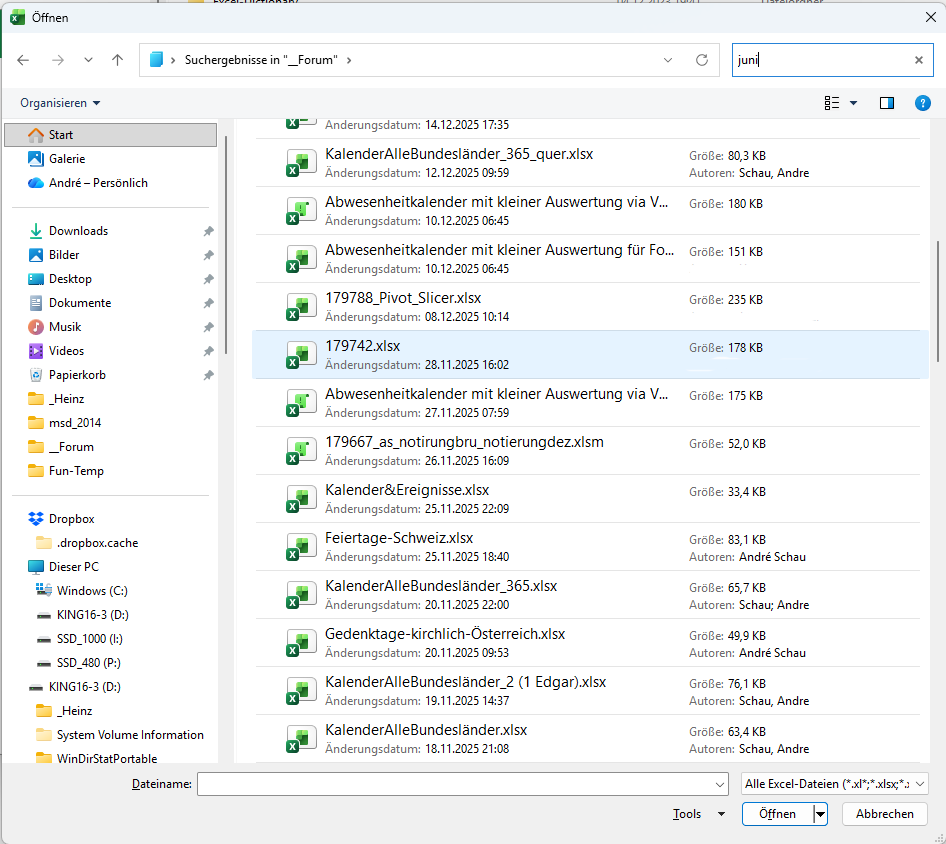
... ich vermute, da ist sicher juni drin, aber nicht dran ;-)
Forumbeitrag
Excel-Version des Fragestellers:
2022
Erfahrungslevel des Fragestellers:
Excel gut - VBA gut
RPP63
21.05.2026 04:35:12
AW: off topic
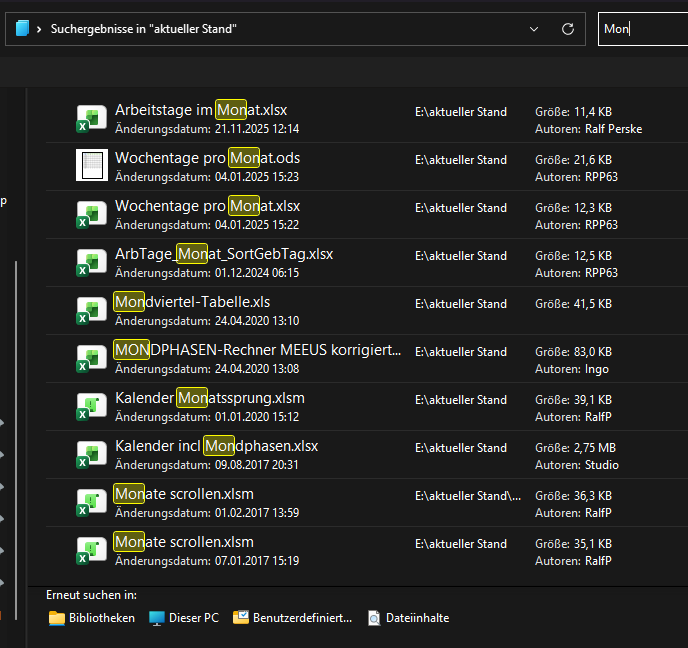
Hmmmh …
Forumbeitrag
Excel-Version des Fragestellers:
2022
Erfahrungslevel des Fragestellers:
Excel gut - VBA gut
schauan
21.05.2026 06:45:10
AW: off topic
Moin Ralf,
Der Punkt ist, dass ohne Angabe der Erweiterung auch in den Dateien gesucht wird. *juni*.xl* bringt in meinem Fall z.b. kein Ergebnis. Solche Dateien hab ich keine.... Nur juni bringt auch andere, wenn juni drin steht. Ist auch nicht casesensitive
Der Punkt ist, dass ohne Angabe der Erweiterung auch in den Dateien gesucht wird. *juni*.xl* bringt in meinem Fall z.b. kein Ergebnis. Solche Dateien hab ich keine.... Nur juni bringt auch andere, wenn juni drin steht. Ist auch nicht casesensitive
Forumbeitrag
Excel-Version des Fragestellers:
2022
Erfahrungslevel des Fragestellers:
Excel gut - VBA gut
RPP63
24.05.2026 11:08:48
Endlich Zeit gehabt …
Moin André!
Ich grabe den Thread nach 3 Tagen wieder aus.
Zunächst konnte ich Dein geschildertes Verhalten nicht nachvollziehen.
Jetzt habe ich mal in den Einstellungen gesucht und bin fündig geworden:
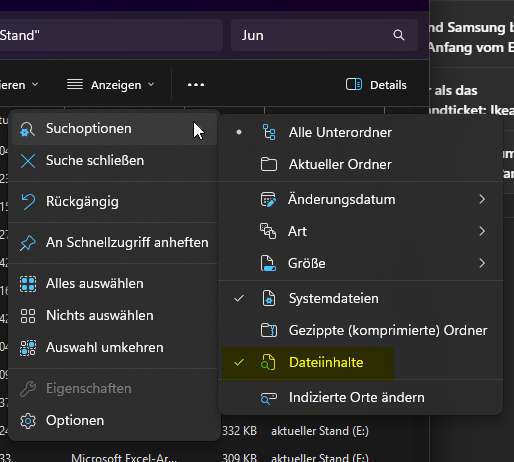
"Dateiinhalte" ist imo standardmäßig deaktiviert.
Wähle ich es ab, funktioniert mein kurzer Weg!
Gruß Ralf
Ich grabe den Thread nach 3 Tagen wieder aus.
Zunächst konnte ich Dein geschildertes Verhalten nicht nachvollziehen.
Jetzt habe ich mal in den Einstellungen gesucht und bin fündig geworden:
"Dateiinhalte" ist imo standardmäßig deaktiviert.
Wähle ich es ab, funktioniert mein kurzer Weg!
Gruß Ralf
Forumbeitrag
Excel-Version des Fragestellers:
2022
Erfahrungslevel des Fragestellers:
Excel gut - VBA gut
schauan
24.05.2026 17:15:44
AW: Endlich Zeit gehabt …
... Hi Ralf,
bei mir ist das nicht aktiviert ... Ich habe mal google gefragt - nicht chatGPT - und bekomme dort:
Windows Explorer Suche in Dateien standard
Die Standard-Suche im Windows Explorer sucht nach Dateinamen und teilweise auch nach Inhalten.
Bei Microsoft steht übrigens das:
Gibt es Verbesserungen für die Suche?
Um Ihre Suchergebnisse zu verbessern, führen Copilot+ PCs die semantische Indizierung zusammen mit der herkömmlichen Indizierung durch. Unterstützte Dateiformate sind .txt, .pdf, .docx, .doc, .rtf, .pptx, .ppt, .xls, .xlsx für Dokumente und .jpg/.jpeg, .png, .gif, .bmp, .ico für Bilder. Die semantische Indizierung macht Ihre Suchvorgänge leistungsfähiger, da Elemente, die in der Nähe Ihrer Suchbegriffe liegen und damit in Zusammenhang stehen, ebenfalls in die Suchergebnisse aufgenommen werden. Wenn Sie beispielsweise nach Nudeln gesucht haben, erhalten Sie möglicherweise auch Ergebnisse für Lasagne, einschließlich Bildern, die Nudeln oder Lasagne enthalten.
Allerdings habe ich den Windows-Copilot bei mir auch nicht drauf / aktiv :-(
bei mir ist das nicht aktiviert ... Ich habe mal google gefragt - nicht chatGPT - und bekomme dort:
Windows Explorer Suche in Dateien standard
Die Standard-Suche im Windows Explorer sucht nach Dateinamen und teilweise auch nach Inhalten.
Bei Microsoft steht übrigens das:
Gibt es Verbesserungen für die Suche?
Um Ihre Suchergebnisse zu verbessern, führen Copilot+ PCs die semantische Indizierung zusammen mit der herkömmlichen Indizierung durch. Unterstützte Dateiformate sind .txt, .pdf, .docx, .doc, .rtf, .pptx, .ppt, .xls, .xlsx für Dokumente und .jpg/.jpeg, .png, .gif, .bmp, .ico für Bilder. Die semantische Indizierung macht Ihre Suchvorgänge leistungsfähiger, da Elemente, die in der Nähe Ihrer Suchbegriffe liegen und damit in Zusammenhang stehen, ebenfalls in die Suchergebnisse aufgenommen werden. Wenn Sie beispielsweise nach Nudeln gesucht haben, erhalten Sie möglicherweise auch Ergebnisse für Lasagne, einschließlich Bildern, die Nudeln oder Lasagne enthalten.
Allerdings habe ich den Windows-Copilot bei mir auch nicht drauf / aktiv :-(
Forumbeitrag
Excel-Version des Fragestellers:
2022
Erfahrungslevel des Fragestellers:
Excel gut - VBA gut
snb
20.05.2026 17:29:14
AW: off topic